How to Log In to JuicyChat AI
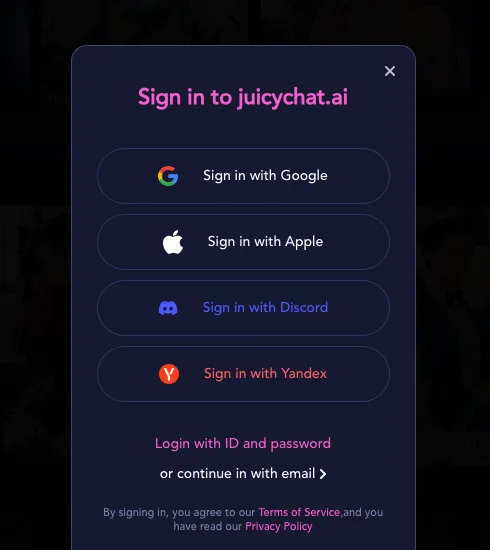
Quick answer: You can log in to JuicyChat AI with Google, Apple, Discord, Yandex, or your email and password, directly on the official site or app. The login button is easy to spot at the top of the site or on the app’s main screen.
Getting into your JuicyChat AI account
Jumping back into your conversations is quick once you know where to look. For returning users, these steps will get you chatting fast:
- Go to the official JuicyChat AI website or open the app on your device.
- Click or tap the "Login" button at the top right of the page or on the main app screen.
- Choose your preferred sign-in method: Google, Apple, Discord, Yandex, ID and password, or email.
- Enter your details and complete any security checks.
- If using email, check for a verification link if prompted.
- Once signed in, you’ll land right back in your chat dashboard.
It’s a straightforward process, designed to minimize clicks so you can focus on your AI companions.
JuicyChat AI login options
JuicyChat AI offers several sign-in methods. This flexibility is handy if you need to regain access after switching devices or losing a password.
| Method | When it’s handy |
|---|---|
| Quick if you use Gmail often | |
| Apple | Easy on iPhone, iPad, Mac |
| Discord | If you use Discord to manage logins |
| Yandex | For users with Yandex accounts |
| ID/password | Classic option, memorable everywhere |
| Useful if you prefer email-only access |
Choosing more than one login method can make recovery simpler if you forget details later.
Logging in on your phone
Switching from desktop to mobile is smooth, whether you use the JuicyChat AI app or a mobile browser. Here’s how it works:
- Download the official JuicyChat AI app from the App Store or Google Play.
- Alternatively, open your mobile browser and visit the official JuicyChat AI website.
- Tap the "Login" button on the main screen.
- Pick your sign-in method from the available options.
- Enter your login details and verify as needed.
- You’ll be brought to your chats, with your account details synced.
You can move between devices without losing your chat history or subscription benefits.
Make sure you're on the real JuicyChat AI site
Look closely at the web address and app developer before entering your details. Only sign in on the official juicychat-ai.info site or the official app from the App Store or Google Play, published by the JuicyChat operator. There are copycat domains and apps out there—including one on Google Play named 'JuicyChat-RolePlay' by an unrelated developer.
Tip: This review site is independent and will never ask for your password or login details. If anything feels off, double-check the domain or developer before continuing.
Closing your account
Logging out simply signs you off; your account and subscription remain active. Cancelling a subscription stops future payments but keeps your access until the current period ends. Deleting your account is permanent and removes your data and chats—make sure to cancel any active subscription first to avoid unexpected charges.
Follow the instructions in the app or on the website for cancellation and deletion. Only perform these actions from your account settings on the official JuicyChat AI platform.
FAQ
Can I use one JuicyChat AI account on several devices?
Yes, you can sign in with the same JuicyChat AI account on multiple devices, like your phone and computer. Your chats and subscription benefits will stay synced.
Where is the JuicyChat AI login page?
The login page is accessible from the top right corner of the official JuicyChat AI website or from the main screen of the official app.
How do I reset my JuicyChat AI password?
On the login screen, select the option to reset your password if you’re signing in with an ID or email. Follow the instructions sent to your email to create a new password.
How do I delete my JuicyChat AI account?
Account deletion is available in your account settings on the official site or app. Be sure to cancel any active subscriptions before you delete your account.
Can I log in to JuicyChat AI with Google?
Yes, Google is one of the available sign-in options for JuicyChat AI, making it quick to access your account if you have a Google account.